Best Waves Plugins for Vocals 2026
What are the best Waves plugins for vocals? There are a lot of them, which is the whole problem. I have worked with all of them over the years, so this guide is the filtered version.
The plugins are in alphabetical order. There is a short list below for anyone who just wants the names. After that, for each plugin, I explain what it does, why I like it, and how I use it.
This post contains affiliate links. If you buy through one I earn a small commission at no extra cost to you. It helps keep the site going. As always: do not buy anything unless you are sure it is what you need.
Contents
- Waves Abbey Road Saturator
- Waves Butch Vig Vocals
- Waves DeBreath
- Waves Doubler
- Waves EMO-D5 Dynamics
- Waves H-Delay Hybrid Delay
- Waves H-Reverb
- Waves Ovox Vocal ReSynthesis
- Waves Renaissance Channel
- Waves Renaissance DeEsser
- Waves Renaissance Vox
- Waves Scheps Omni Channel
- Waves Vocal Rider
Waves Abbey Road Saturator
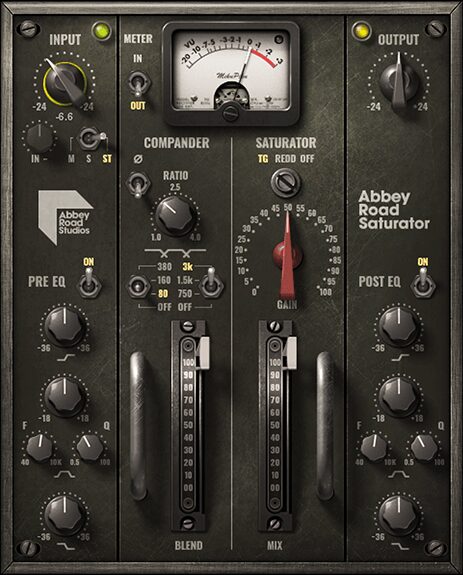
If you want attitude, vibe and strength on a vocal, Waves Abbey Road Saturator is an excellent option. It has pre and post EQ, a compander and a saturation section. It works in most situations and it is quick to get a good result with.
The compander is what makes it special to me. It compresses the pre-EQ signal, passes it through low-pass and high-pass filters, then expands it. That excites the signal and gives you control over how different frequencies distort, based on the compander ratio. Sounds complicated? Do not worry. Play with it until you like what you hear. That is what I do, and it usually does not take long. It is one of the best Waves plugins for rap vocals, because the compander gets you that tight, up-front sound easily.
Tips:
- It is easy to end up too bright with this one. The post EQ is there for a reason. Use it to counter the imbalance.
- Even though it is called a saturator, less is more. Push the saturation too hard and it gets brittle. A little goes a long way on vocals.
Waves Butch Vig Vocals
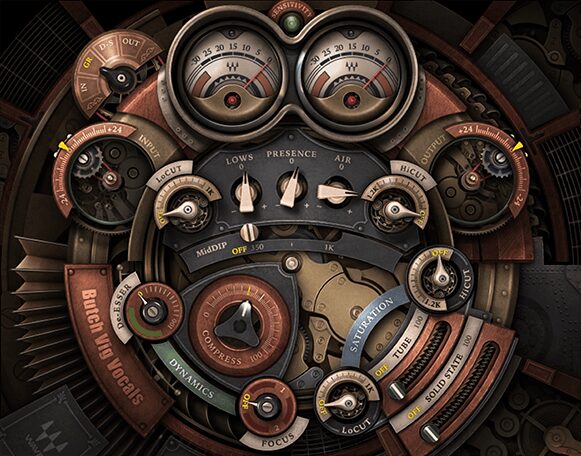
If you are not a technical person and you want a one-stop shop for mixing vocals, Waves Butch Vig Vocals might be the one. It covers your basic vocal processing needs in a nice package.
I prefer it over Waves CLA Vocals or the Maserati VX1. Rather than piling on effects, it is built around useful, finely calibrated controls, the things you actually need to solve problems and get the basic sound right. If you are new to vocals, playing with this plugin will teach you what to listen for.
Tips:
- Set the input correctly. It is designed to work best when the input sensitivity LED at the top is blinking green or yellow, not red.
- Use the In and Out meter switches, top left, to watch the relationship between input and output level. Keep them about the same. It helps you judge the sound.
Waves DeBreath
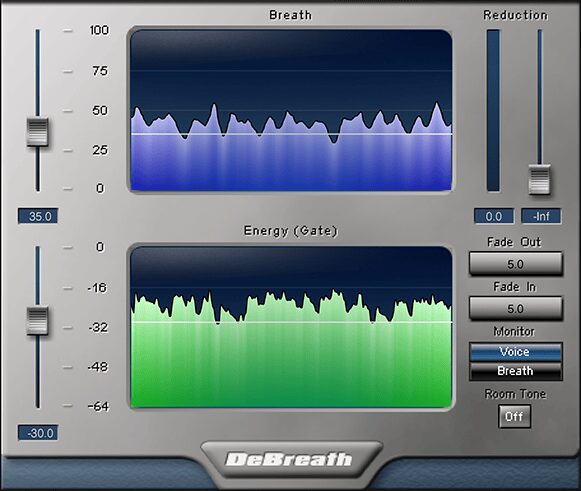
Waves DeBreath is a useful companion for vocal mixing. Breath sounds are often a problem, because the mic picks them up much louder than they actually are, and compression makes it worse, so gasps poke through the mix in a nasty way.
DeBreath uses an algorithm to detect the breaths in a take, with a little help from you, and lets you reduce their level without touching the rest. Traditionally that is tedious manual editing work. It gives you two thresholds, Breath and Energy. When Breath is above its threshold and Energy is below its threshold, the plugin classes the material as breathing and applies reduction. I have used it with several singers and it has always worked beautifully. Demo it on your own material first, but it works.
Tips:
- Instead of removing breaths entirely, it often sounds better to just reduce them a little, enough that they are not jumping out.
- Use the Room Tone function to fill the gaps with subtle room tone.
- Monitor the breath-only signal to make sure you are hitting your targets. Just hit the Breath button.
Waves Doubler
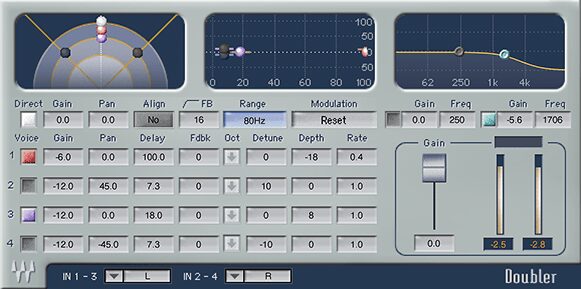
Waves Doubler is a classic. It is a sound enricher and a stereo widening effect, and it is useful for all sorts of experimental work, but above all it makes vocals pop in the mix.
It is old school, and that is part of the appeal for me. It sounds great, it is simple and straightforward, and it gives you good results every time. It also has fantastic presets from top mix engineers to explore.
Tips:
- Use the modulation to add small amounts of movement. It can liven up a vocal nicely.
- It is tempting to use all four voices. Often two will do the job in a cleaner way, cluttering the mix less.
Waves EMO-D5 Dynamics
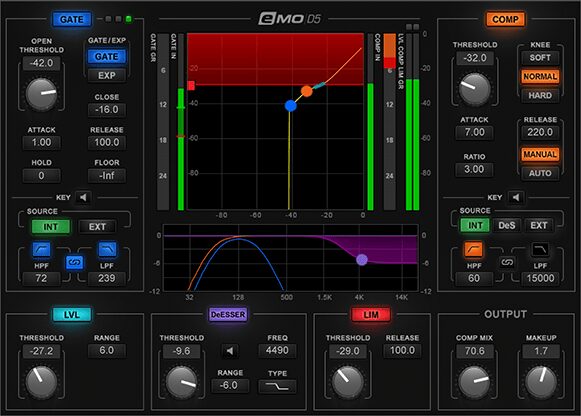
If you want a complete dynamics toolkit for vocals, Waves EMO-D5 gives you gating, compression, levelling, de-essing and limiting. It is a very clean sounding plugin, no analog emulation or other funky stuff.
The interface is clear and nice to use. It was designed to work well on touch screens, and it shows. Zero latency, low CPU, controls that do what they are supposed to. A great package for vocals.
Tips:
- Switch the sections on one by one. It is easier to hear what each one is doing that way.
- The visual metering is good. If you are unsure what a visual represents, the manual explains it well.
Waves H-Delay Hybrid Delay
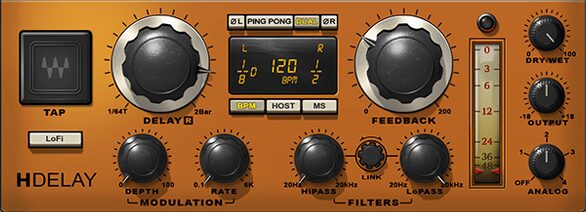
Delay is an essential vocal effect, and Waves H-Delay just does it. Slap-back, ping-pong, tempo-sync with modulation, filtering, flanging, phasing, real old school effects through an intuitive interface.
What I like most is how it sounds. It has character and vibe. If I had to describe it in one word: thick, but not in an obvious or obtrusive way. It is one of those plugins that almost always sounds good the moment you put it on, equally good for big dubby delays or short dimension delays.
Tips:
- The LoFi button emulates the sample rate reduction that many classic analog delays had by design. It gives the delay a nice edge.
- Use the modulation to bring slight movement to the delays. It brings the sound alive, especially synced to a BPM.
Waves H-Reverb
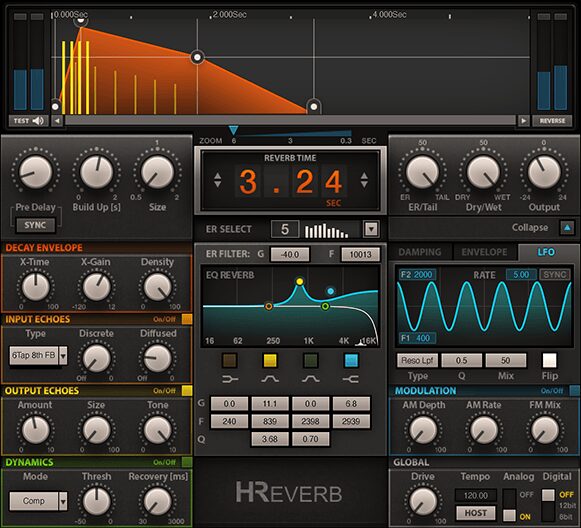
A reverb can make or break a vocal, so you need a good one. Waves H-Reverb is built for lush, spacious, warm reverberation, based on FIR (Finite Impulse Response) technology.
I love exploring its presets, the Hardware category in particular, which replicates a lot of classic units. It also has clever options for tailoring the sound exactly how you want, so it does not feel like an impulse response reverb at all. It is more flexible than most algorithmic reverbs.
Tips:
- It installs as two versions: H-Reverb and H-Reverb (long). The regular goes up to 6 seconds of decay, the long version up to 12. Use the regular version most of the time for lower CPU, and keep the long one for when you actually need it.
- The Global section has options for different reverb characters. My favourite is the Drive knob. It pushes the input against a clipper, similar to pushing the input of a hardware reverb hard, which I still do all the time.
- Use the Duck feature to make the wet signal duck when the input is present. Great in dense mixes where you want to maximise the impact of the direct vocal, and great as a creative effect.
Waves Ovox Vocal ReSynthesis
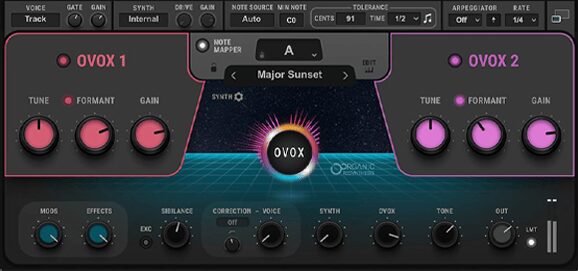
Waves Ovox lets you create voice-based musical effects without a keyboard. It is easy to turn a vocal into something completely crazy but musically interesting. It is built for vocals but works on other instruments too.
There is a lot going on in here: autotune effects, vocoding, all of it. Browse the presets and you will see it is close to endless. It is a ton of fun and a great source of inspiration, it always gives you something unexpected but usable, and it can also be used in subtle, deliberate ways. It comes with preset chords, scales and harmonies you can edit.
Tips:
- It can seem extreme at first. Adjust the Voice, Synth and Ovox dials in the mixer section for more subtle effects. You can also run it on an FX bus to enhance the vocal you already have.
- By default it only shows the top part of the interface. The icon with two squares, top right, expands it to reveal the powerful EQ, FX and modulation sections.
- It is a deep plugin. Read the manual to understand it properly.
Waves Renaissance Channel
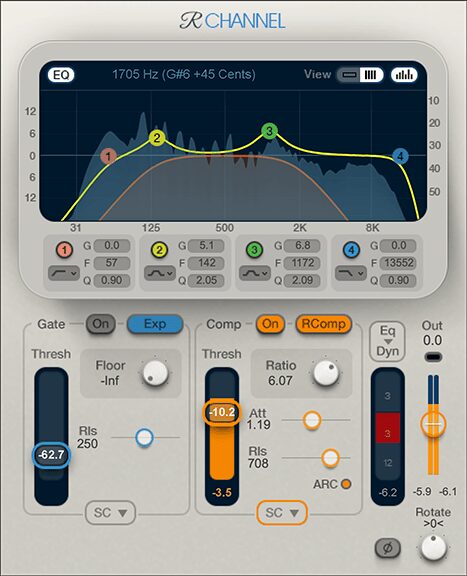
Waves Renaissance Channel is a straightforward channel strip: EQ, gate and compression with good sidechain controls, so it de-esses too. It is all about simplicity and functional design. The compressor has an RVox mode tuned for vocals.
It is a utilitarian plugin that gets the job done without fuss and sounds good. The spectrum analyser helps you spot problem areas. If you want a simple channel strip that works, this is the one. If you want all the bells and whistles, look at the Scheps Omni Channel below.
Tips:
- It has presets from around 40 professional mixing engineers. Browse them to see the range of use cases and how different people set things up.
- The RVox mode in the compressor works great for vocals in most situations.
Waves Renaissance DeEsser
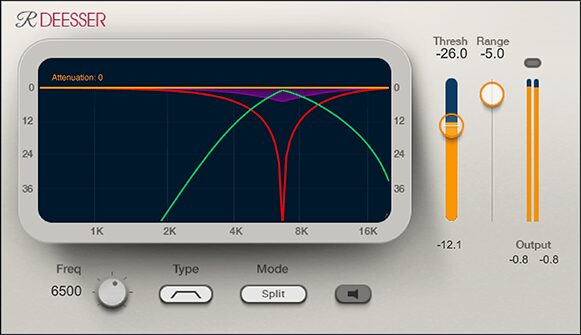
If you do not have a good de-esser, Waves Renaissance DeEsser is a great choice. Simple, intuitive, affordable, and it gets the job done. It combines technology from the Waves C4, Renaissance Vox and the Waves DeEsser, with features that make it cleaner and more effective.
In a de-esser I want to be done quickly, and that is exactly why I prefer this one over the other Waves options. Clean interface, thoughtful feature set. The phase-compensated crossover avoids the coloration and phase modulation you would otherwise get as artifacts of the compression. The adaptive threshold adjusts to the input signal instead of using an absolute value, which gives more natural results.
Tip: Set it and forget it. I love it.
Waves Renaissance Vox
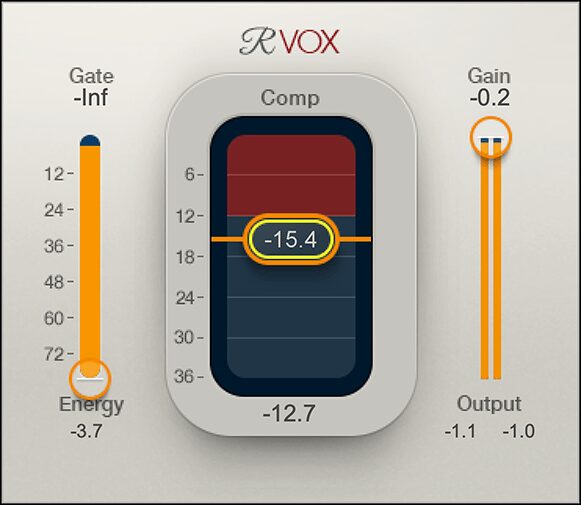
Waves Renaissance Vox combines gating, compression and limiting into three very simple, one-parameter controls.
It is not for everyone. But if you are not confident with traditional compressors yet, it might be just the ticket, and it works well in most situations. It is also good when you just need compression fast, for monitoring, or to make podcast dialogue sound better, especially paired with Vocal Rider.
Tips:
- The Gain control is also your limiter ceiling. Be careful not to crush the vocal with it.
- To hear the compressor without a level change, link the Compression and Gain faders by drawing a box around them. They then move together.
Waves Scheps Omni Channel
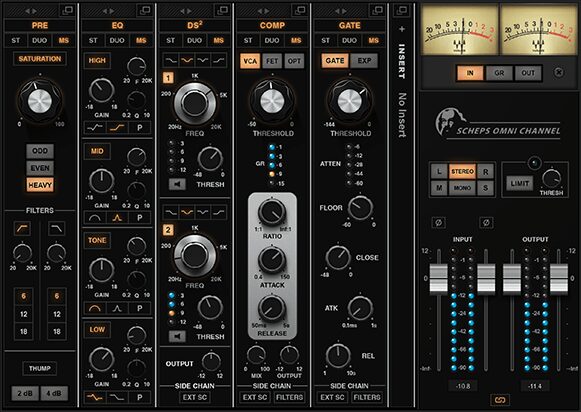
Waves Scheps Omni Channel is a very well designed set of mixing tools, a true workhorse. It has six sections you can rearrange freely: saturation and filters, gate, compressor (three of them, VCA, FET and Opto), de-esser, EQ, and an insert slot for any Waves plugin you own. There is also an output section with monitoring controls and a brickwall limiter.
It is my favourite channel strip in the whole Waves catalog. You cannot call it simple, but it is well thought out and the interface is nice. It is powerful and flexible, and the insert slot is genuinely useful on vocals, where you can drop a reverb or chorus right inside the chain. It sounds great and it has everything you need to make a vocal shine.
Tips:
- The metering and monitoring section is useful and well laid out. The VU is great, and I love having the mid, side and mono listening options right there.
- Use the little square icons, top right of each module, to expand the interface and reach more options.
- Play with the compressors. They all sound distinct and good in their own way. The FET is my favourite, great for an aggressive, in-your-face sound.
- I am not a fan of how the Saturation module sounds when pushed, so I go easy on it and use other things for saturation.
- The gate is one of the best I have used, quick to find working settings whether you want subtle cleanup or a creative effect.
- Gating the Mid and Side signals separately is very interesting.
- The Mid and Tone EQ bands are identical except in wide mode, where Mid is wider and cleaner and Tone is narrower and more smeary. Mid is better for enhancing the natural character of the source. Tone is better for making it pop and giving it colour while keeping it glued to the rest.
Waves Vocal Rider
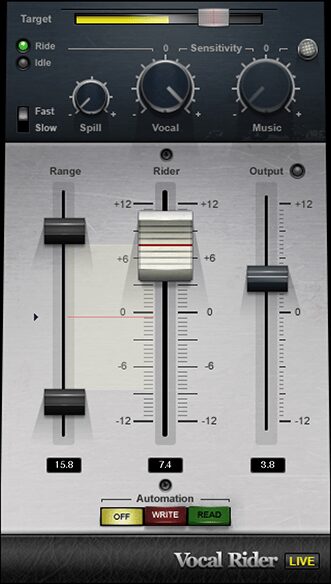
Waves Vocal Rider takes some of the work off you by automatically adjusting the level of a vocal take to make it more even. You set the target range for the vocal level against the rest of the mix. It has some clever controls and it does a good job of levelling vocals.
It can write volume automation and flip into read mode, so you can then adjust by hand. You can also just let it do a little pre-levelling while you control the rest yourself.
Tips:
- I get the best results following Vocal Rider with a compressor (EMO-D5 or RVox work well). A little levelling first, then compression. The levelling keeps the compressor working in its optimal range more of the time, which gives you a more solid vocal sound with fewer artifacts.
- You can grab the big fader at any time and make your own adjustments. As soon as you let go, Vocal Rider continues automatically. Useful for recording automation.
Summing up
There are a lot of Waves plugins to choose from for vocals. When I narrowed it down, I used three pointers: sound, ease of use, and value for money.
Do not buy at full price if you can wait. Waves rotate their sales constantly.
Questions? Drop a comment and I will do my best to help.
Tracked the vocal, mixed it, and want it finished properly? I have been mastering electronic music since 2009. Send a project.